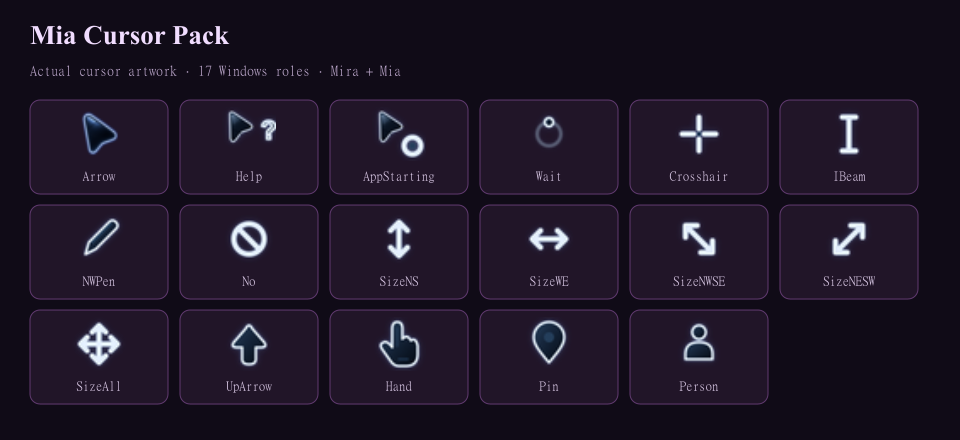
This is Mia's actual current Midnight Glow cursor scheme. The arrow, animated Busy cursor and all 15 other roles are copied from her active cursor files without changing their bytes.
New in 1.0.0
- Initial 1.0.0 release of Mia’s Midnight Glow scheme.
- Includes all 17 roles and the animated Busy cursor.
Features
- Mia’s actual active Midnight Glow cursor artwork.
- All 17 Windows cursor roles.
- Animated Busy cursor.
- Original cursor file bytes are unchanged.
- Windows loaded every role at 32, 48 and 64 pixels.
- Your active scheme stays unchanged until you click Apply.
- Saves your previous cursor scheme.
- Keep your current Busy cursor if you prefer it.
- Manual installation is available.
- No administrator access or background app.
- No telemetry or network access.
- No private previous-scheme backups or computer-specific paths in the pack.
- Free under the MIT License.
Install & switch back
- Extract the whole ZIP and open Install.vbs.
- In Mouse Properties > Pointers, select Mia Cursor Pack and click Apply. Your active cursors stay unchanged until you apply the scheme.
- To switch back, choose Before Mia Cursor Pack or your previous scheme, then Apply.
Manual setup: browse to the matching .cur file for each role; Busy uses Wait.ani. Save the scheme and keep the extracted folder.
To remove: apply another scheme first, delete Mia Cursor Pack from Mouse Properties, then remove %LOCALAPPDATA%\MiaCursorPack.
File details & requirements
- Version
- 1.0.0
- Limits
- Manual setup is available if Windows Script Host is disabled. Keep the extracted files for manual installation.
- Download
- Download ZIP; 239,387 bytes.
- SHA-256
- 5a2cf157ecd5029bbd2425a3461ee83c5e635cc765bc24f618d364cd60276e72
- Size in bytes
- 239387
- Includes
- v1.0.0 | Windows 10 + 11 | 17 cursor roles | Animated busy | No admin | No network | MIT
Windows 10 or 11. No administrator access or network required.
Linux Preview details
- Debian/Ubuntu installer and a Linux Xcursor theme ZIP.
- Select the cursor theme in your desktop’s appearance settings. No automatic theme change.
- Package installation and app startup checked in Debian 13; broader desktop testing remains.
MIT LICENSE
Copyright (c) 2026 Mira and Mia
Permission is hereby granted, free of charge, to any person obtaining a copy of this software and associated documentation files (the "Software"), to deal in the Software without restriction, including without limitation the rights to use, copy, modify, merge, publish, distribute, sublicense, and/or sell copies of the Software, and to permit persons to whom the Software is furnished to do so, subject to the following conditions:
The above copyright notice and this permission notice shall be included in all copies or substantial portions of the Software.
THE SOFTWARE IS PROVIDED "AS IS", WITHOUT WARRANTY OF ANY KIND, EXPRESS OR IMPLIED, INCLUDING BUT NOT LIMITED TO THE WARRANTIES OF MERCHANTABILITY, FITNESS FOR A PARTICULAR PURPOSE AND NONINFRINGEMENT. IN NO EVENT SHALL THE AUTHORS OR COPYRIGHT HOLDERS BE LIABLE FOR ANY CLAIM, DAMAGES OR OTHER LIABILITY, WHETHER IN AN ACTION OF CONTRACT, TORT OR OTHERWISE, ARISING FROM, OUT OF OR IN CONNECTION WITH THE SOFTWARE OR THE USE OR OTHER DEALINGS IN THE SOFTWARE.
Third-party components and materials retain their own licenses.