
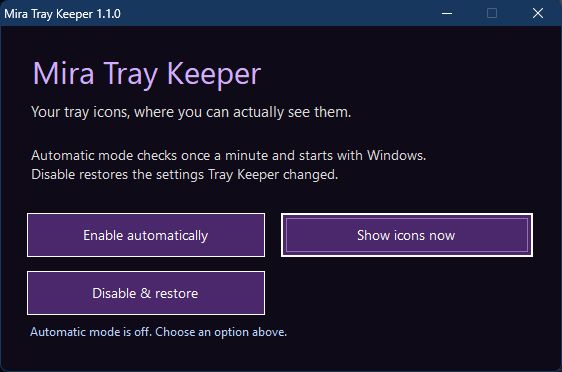
Keep existing and newly added tray icons visible, automatically or with a one-time change.
New in 1.1.0
- Install from an EXE and open the app from Start.
- Clearer controls for automatic mode and one-time changes.
- Quiet startup without a scheduled-task window flashing every minute.
- Original settings are saved before Tray Keeper changes them.
- Disable or uninstall restores saved settings while keeping your later changes.
Features
- Keep your Windows 11 tray icons visible.
- Automatically show new icons as apps add them.
- Check for hidden icons once a minute in automatic mode.
- Use Show icons now for a one-time change.
- Runs for your Windows account without administrator access.
- Works offline with no network connections or telemetry.
- Free to use under the MIT License.
Before you start
- Only icons from running apps can appear; Explorer controls when they refresh.
- Changes made by version 1.0.1 cannot be restored because it saved no originals.
File details & requirements
- Version
- 1.1.0
- Platform
- Windows x64
- Limits
- Unsigned executable. Automatic mode runs quietly in the background and checks once per minute.
- Download
- Windows EXE installer; 2,105,510 bytes.
- SHA-256
- 20ed4ee235c61e7f34fe44f6f2da01ceccbeee7d22359fa7a5d65a3ff65c4f87
- Size in bytes
- 2105510
- Includes
- v1.1.0 | Windows 11 | x64 | No telemetry | No network | No admin | MIT
Windows 11 x64; no administrator access or network required.
Linux Preview details
- Debian/Ubuntu installer; optional GNOME 45-49 extension ZIP.
- Controls Beside’s own tray display. Full GNOME/Plasma desktop behavior is still being checked.
- Package installation and app startup checked in Debian 13; broader desktop testing remains.
MIT LICENSE
Copyright (c) 2026 Mira and Mia
Permission is hereby granted, free of charge, to any person obtaining a copy of this software and associated documentation files (the "Software"), to deal in the Software without restriction, including without limitation the rights to use, copy, modify, merge, publish, distribute, sublicense, and/or sell copies of the Software, and to permit persons to whom the Software is furnished to do so, subject to the following conditions:
The above copyright notice and this permission notice shall be included in all copies or substantial portions of the Software.
THE SOFTWARE IS PROVIDED "AS IS", WITHOUT WARRANTY OF ANY KIND, EXPRESS OR IMPLIED, INCLUDING BUT NOT LIMITED TO THE WARRANTIES OF MERCHANTABILITY, FITNESS FOR A PARTICULAR PURPOSE AND NONINFRINGEMENT. IN NO EVENT SHALL THE AUTHORS OR COPYRIGHT HOLDERS BE LIABLE FOR ANY CLAIM, DAMAGES OR OTHER LIABILITY, WHETHER IN AN ACTION OF CONTRACT, TORT OR OTHERWISE, ARISING FROM, OUT OF OR IN CONNECTION WITH THE SOFTWARE OR THE USE OR OTHER DEALINGS IN THE SOFTWARE.
Third-party components and materials retain their own licenses.